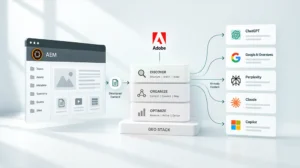
AEM 6.5 support ends August 31, 2026, for Managed Services customers, and February 2027 for on-premises. Three paths forward exist: AEM 6.5 LTS, AEM as a Cloud Service or AEM as a Cloud Service with Edge Delivery Services. The deadlines are the same for everyone. The paths aren’t.
Key Takeaways
- Adobe Managed Services support for AEM 6.5 ends August 31, 2026. On-premises core support ends February 2027, with extended support available until February 2028.
- AEM 6.5 LTS buys time without requiring a cloud migration, but it permanently blocks access to AI agents on LTS deployments, whether on-premises or on Managed Services.
- AEM as a Cloud Service unlocks the full AI agent layer, continuous governance and personalization at scale.
- AEM as a Cloud Service with Edge Delivery Services adds a 100 Lighthouse score baseline and faster authoring on top of everything Cloud Service offers.
- The right path depends on your timeline, integration complexity and AI requirements, not on which option sounds most modern.
The Dates That Are Already Decided
This isn’t a future roadmap item. The deadlines are confirmed and published.
According to Adobe’s releases roadmap, the support timeline is:
|
Customer Type |
Core Support Ends |
Extended Support Ends |
|
Adobe Managed Services |
August 31, 2026 |
Not applicable |
|
On-Premise |
February 2027 |
February 2028 |
Service Pack 26 was the last supported service pack for AEM 6.5. AEM 6.5 LTS covers both customer types and extends the support window. But LTS is a bridge, not a destination. You still need to decide where to go next.
In our experience, teams that treat this as a future decision consistently underestimate how much lead time a well-executed upgrade requires. Starting the evaluation now isn’t early. For many teams it’s already late.
The Three Paths: What Each One Actually Means
Path 1: AEM 6.5 LTS
LTS stands for Long Term Support. It’s a separate product from AEM 6.5, built on newer Java versions (17 and 21) rather than the older Java 8 and 11 that AEM 6.5 runs on. It receives security patches and service packs without requiring a move to the cloud.
Think of LTS as pressing pause. Your team keeps working in a familiar environment. You defer the cloud migration and get more time to plan.
LTS gives you extended support on a familiar on-premise or managed services setup, lower short-term disruption than a cloud migration and more time to plan a deliberate move to Cloud Service later.
What LTS doesn’t give you: according to Adobe’s AI Agents overview, AI agents are only available on AEM as a Cloud Service and Edge Delivery Services. They’re not currently available on AEM 6.5, AEM 6.5 LTS, on-premises deployments or Managed Services. That’s a platform-level limitation built into the agent orchestration architecture, not a temporary rollout gap. LTS also doesn’t include Edge Delivery Services or automatic platform updates.
LTS is the right choice when your team needs time, not when it needs capability.
Path 2: AEM as a Cloud Service
AEM as a Cloud Service is the cloud-native version of AEM. Adobe manages the infrastructure. The platform updates automatically so your team is always on the latest version without scheduling manual upgrades.
For non-technical stakeholders, the simplest way to think about it is this: instead of your team managing the platform, Adobe manages it. Your team focuses on using it.
Cloud Service unlocks the full AI agent layer, including the Governance Agent for brand and compliance checks and the Experience Production Agent for content updates, page creation and form building. It updates automatically without manual service pack management, and its infrastructure scales with traffic on its own. Adobe documents HIPAA-ready configurations specifically for Cloud Service, an option it doesn’t extend to on-premise LTS deployments. Cloud Service also connects natively to Adobe Experience Platform and the rest of the Experience Cloud suite.
What to plan for: you’ll need to review and refactor custom code and redesign integrations with other systems. It’s a structured migration program, not a simple switch. For teams working through what that involves, our guide on why and how to migrate to AEM as a Cloud Service covers the decision factors clearly.
Path 3: AEM as a Cloud Service with Edge Delivery Services
Edge Delivery Services sits on top of Cloud Service and adds a performance delivery layer. Edge servers close to each visitor serve the content instead of a single central location, which makes pages faster by default.
Every EDS site targets a perfect 100 Lighthouse score out of the box, and Adobe treats that as the expected baseline rather than an advanced optimization goal. That score reflects how fast, accessible and well-structured a page is, and it directly affects search rankings and conversions. For a full explanation of what that means, our post on how AEM hits a 100 Lighthouse score is worth reading before evaluating this path.
EDS adds a 100 Lighthouse score as the baseline on every page. Authors can write in Word or Google Docs and publish directly, and EDS pages can coexist with existing AEM Sites pages on the same domain during migration.
What EDS requires beyond Cloud Service: the front-end of your current AEM site needs to be rebuilt. Existing templates, components and styling code don’t transfer directly. For teams evaluating what that rebuild involves, our guide on what it takes to move a live AEM site to Edge Delivery covers the scope and the incremental migration model.
How to Choose: The Decision Framework
No single path suits every organization. Five variables determine which one fits yours.
|
Variable |
Points Toward LTS |
Points Toward Cloud Service |
Points Toward Cloud Service + EDS |
|
Timeline pressure |
Need time before committing to cloud |
Ready to migrate in 12 to 18 months |
Ready to migrate and want performance gains |
|
AI capability requirement |
AI is not a priority in the next 12 months |
AI agents needed within the next year |
AI agents plus high-performance delivery both required |
|
Integration complexity |
High complexity needs assessment time |
Integrations already assessed and compatible |
Integrations assessed and front-end rebuild scoped |
|
Regulated environment |
HIPAA not required |
HIPAA readiness required |
HIPAA readiness plus AI search optimization needed |
|
Appetite for front-end change |
Low: want minimal disruption |
Medium: willing to refactor for Cloud Service |
High: willing to rebuild front-end for EDS performance |
Teams choosing LTS without a defined Cloud Service plan tend to face the same decision again 18 months later, with less time and more technical debt. LTS makes sense as a bridge when it has a clear destination. Without one, it delays a decision rather than solving it.
For a structured way to assess where your current environment stands, this AEM implementation checklist maps the technical and governance readiness questions that determine which path is realistic for your team.
The AI Capability Gap Is the Real Differentiator
The support deadline creates urgency. The AI capability gap is what makes the three paths unequal.
LTS deployments won’t have access to AI agents, whether on-premises or on Managed Services. This is confirmed, not a future product decision that could change. Teams that stay on LTS lose access to the tools that let AI operate within governed content workflows instead of alongside them.
For regulated industries, this matters most. The Governance Agent runs continuous compliance checks before content goes live. That capability doesn’t exist on LTS. On Cloud Service, it’s available today. For teams in financial services, healthcare or enterprise retail, our post on AEM for regulated industries covers governance capabilities in Cloud Service that LTS can’t match.
What the Upgrade Actually Involves
AEM 6.5 to LTS: the lightest path. The main work is a compatibility review of existing custom code against LTS’s newer Java requirements, migration to the LTS service pack track and validation testing. Most teams with a reasonably structured AEM 6.5 environment can complete this in a few months.
AEM 6.5 to Cloud Service: all the LTS compatibility work plus a cloud migration. You’ll need to refactor custom code, redesign integrations and migrate content with validated URL redirects. Realistically, six to 12 months for most enterprise environments.
AEM 6.5 to Cloud Service with EDS: everything Cloud Service requires, plus a front-end rebuild. In our experience, teams that plan the front-end rebuild as a separate, parallel workstream rather than folding it into the Cloud Service migration complete both faster and with fewer post-launch issues.
For teams building the business case for any of these paths, our whitepaper on AEM optimization for enterprise covers where the investment produces the clearest returns.
The Decision That Can’t Wait
The August 31, 2026, deadline for Managed Services customers is here. On-premises teams have until February 2027. Teams that act now can run a deliberate, well-planned program. Teams that wait until the deadline is close will be running a rushed one. The cost difference between those two approaches is significant.
A 30-minute conversation with the NetEffect team can map your current AEM 6.5 environment against all three paths and outline what a realistic program looks like from where you are today.
Frequently Asked Questions
No. LTS is a separate product built on Java 17 and 21 rather than AEM 6.5’s Java 8 and 11. It delivers continued security patches and service packs without requiring a cloud migration.
No. LTS extends the support window, but it doesn’t replace the need to move to Cloud Service eventually. LTS customers, whether on-premises or on Managed Services, also permanently lose access to AI agents.
Simple environments typically complete in three to six months. Complex enterprise environments with many custom components and integrations typically run six to 12 months. Our phase-based AEM implementation roadmap maps where each decision point falls in that sequence.
No. Only teams also moving to Edge Delivery Services need to rebuild their front end. Cloud Service supports existing AEM Sites architectures with Core Components and HTL.
Adobe stops providing security patches, bug fixes and technical support. This creates security and compliance exposure that most regulated organizations can’t accept. Extended support is available for on-premises customers until February 2028 at additional cost but includes no new features.