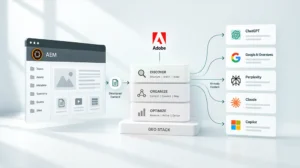
Key Takeaways
- Replatforming to AEM isn’t a lift-and-shift exercise. Content architecture and governance decisions made during migration determine how much of AEM’s capability your team can use after go-live.
- Adobe provides a phased migration framework including the Best Practices Analyzer, the Content Transfer Tool and the Experience Modernization Agent, each with a specific role in reducing migration risk.
- The most expensive migration mistakes happen before any content moves: skipping readiness assessment, carrying forward broken taxonomy and under-resourcing governance design.
- AEM as a Cloud Service is the only deployment model that supports the full AI agent layer, Edge Delivery Services and continuous governance.
- Content migration and code migration are separate workstreams with different timelines and risk profiles, and treating them as one project is a leading cause of go-live delays.
Why Teams Leave Their Current CMS
The decision to replatform rarely starts with a technology preference. It starts with a business problem the current platform can no longer solve.
The patterns are consistent. Content teams are producing more output with the same headcount, and the platform wasn’t built for that volume. Personalization is on the roadmap, but connecting audience data to content delivery requires custom development the current CMS was never designed to support. Governance breaks down under deadline pressure because it depends on manual steps rather than system controls. And AI tools end up living around the platform, not inside it.
AEM as a Cloud Service addresses each of these, but only when the team treats the migration as a strategic program rather than a technical one. NetEffect’s case study on unifying 180 websites with AEM shows what that business case looks like in practice across a large-scale, multi-site environment.
What Makes AEM Migration Different
Most CMS migrations involve moving content from one structured system to another. AEM migration involves that plus several dimensions that need separate planning.
Content architecture isn’t portable. AEM organizes content as pages, content fragments, experience fragments and components. That structure is fundamentally different from most other CMSs. Migrating raw content without redesigning the architecture for AEM’s model creates a rework backlog that surfaces after go-live, not before.
Integrations require rearchitecting. Custom integrations with DAMs, CRMs, analytics platforms and marketing automation tools rarely port directly to AEM. Each one needs evaluation against AEM’s API-driven architecture and independent testing.
Teams need to redesign governance, not replicate it. Carrying forward the governance model from the old CMS misses the opportunity to build compliance controls into the platform from the start. Migration is the right moment to define metadata standards, permission structures and approval workflows correctly, before content populates the new environment.
Deployment model choice affects everything downstream. AEM as a Cloud Service is the only deployment model that supports the full AI agent layer, Edge Delivery Services, continuous governance and HIPAA readiness. For teams weighing this decision, this guide on AEM cloud versus on-premise deployment covers what that choice means for long-term capability.
Adobe’s Migration Framework: Four Phases That Determine Outcomes
Phase 1: Readiness Assessment
The readiness phase determines what the migration will actually involve before any content moves.
Adobe’s Best Practices Analyzer scans an existing AEM environment and flags what needs to change before a move to Cloud Service, cutting out a lot of the manual assessment work teams would otherwise have to do by hand. For teams migrating from a non-Adobe CMS, the equivalent work involves a content audit of the source platform, an integration inventory and a governance gap analysis.
In our experience, the teams that skip this phase and move directly to execution consistently encounter mid-migration scope changes that cost more to resolve than the readiness work would have. The output isn’t a project plan. It’s a realistic picture of complexity that informs one.
Phase 2: Content Architecture Design
This phase decides how the team will structure content in AEM before migration begins. Content model design determines how pages, content fragments and experience fragments fit together. Taxonomy and metadata schema decisions determine which fields you require, how you tag assets and how you classify content. URL structure and redirect mapping determine how you preserve or redirect existing URLs. And the governance model, meaning permissions, approval workflows and rights management, needs to be locked in before content arrives.
The taxonomy and metadata decisions made here have the longest-lasting impact on post-go-live capability. A clean, consistently enforced taxonomy is what makes personalization, AI-assisted authoring and DAM discoverability work. For teams building that foundation, our piece on why content architecture determines AI readiness covers the structural prerequisites that migration teams should treat as design requirements, not post-migration optimizations.
Phase 3: Content Migration Execution
Adobe’s Content Transfer Tool handles the mechanics of moving content from an existing AEM instance into the new Cloud Service environment. For teams migrating from a non-Adobe CMS, the equivalent is a bulk import process that maps source content into AEM’s content model.
Adobe recommends a phased approach to the actual move. Turn off asset processing workflows before ingestion starts, since running them during ingestion tends to degrade performance. Ingest the assets first and run processing workflows afterward in batches. Run the ingestion in wipe mode on the target environment so the team starts from a clean state, and validate content rendering after each batch before moving to the next one.
We consistently see content migration and code migration work best as parallel but separate workstreams. Combining them creates dependencies that slow both down and make issues harder to isolate when they surface.
Phase 4: The Experience Modernization Agent
For teams migrating from another CMS into AEM with Edge Delivery Services, Adobe’s Experience Modernization Agent is a significant accelerator. Per Adobe’s own documentation, it works across a wide range of source CMS platforms and can turn a migration that would normally take months into a matter of weeks or even days. Its capabilities cover the heavy lifting: importing pages in bulk, pulling design systems from an existing site, rebuilding navigation and pulling content through web scraping where needed.
Every change still runs through a GitHub-based review workflow before it goes live, so developers keep full authority over what ships. Speed doesn’t come at the cost of governance.
The CMS Migration Checklist
Before migration begins. Document the business case with specific capability gaps in the current CMS, and confirm the deployment model as AEM as a Cloud Service. Complete a content audit covering volume, types, age and quality, along with an integration inventory that assesses every connected system. Identify governance gaps across metadata, permissions and approval workflows.
During architecture design. Design the content model for AEM’s fragment and component architecture, with a metadata schema that enforces required fields at the system level. Complete and validate the URL mapping and redirect strategy, and document permission structures and approval workflows.
During content migration. Disable asset processing workflows before bulk ingestion begins. Migrate content in batches and validate rendering after each one, test and verify redirect mapping, and validate search and metadata accuracy.
Before go-live. Test every integration at production data volumes, and test permission structures for every user group. Validate performance with production-representative content, document and test the rollback plan, and resource and schedule the stabilization period.
For the implementation sequence behind this checklist, this phase-based AEM implementation roadmap maps each decision to the correct point in the program timeline.
What to Expect After Go-Live
A well-executed AEM migration doesn’t deliver its full return at go-live. It delivers a platform capable of that return as the team activates capabilities in sequence.
Phase | Timeframe | Focus |
Stabilization | Weeks 1-4 | Monitor, resolve issues, validate performance |
Content operations | Months 2-3 | AI-assisted authoring, DAM discoverability, workflow optimization |
Personalization | Months 3-6 | AEP connectivity, audience-content matching |
AI agent layer | Months 6-12 | Governance Agent, Experience Production Agent |
Full optimization | Ongoing | Performance tuning, content supply chain refinement |
Teams that sequence activation deliberately outperform those that try to activate everything at once. The migration creates the foundation. Each phase builds on it.
Starting the Conversation
A 30-minute conversation with the NetEffect team can map your current CMS limitations against AEM’s capability set, identify the migration complexity specific to your environment and outline what a realistic program looks like from readiness assessment to stabilization.
Frequently Asked Questions
Simple migrations with limited integrations and a clean content structure typically complete in three to four months. Complex enterprise migrations with many integrations and multi-site requirements typically run 6 to 12 months. The readiness assessment produces a realistic timeline for your specific environment before the program begins.
Yes. Adobe’s Experience Modernization Agent supports migrations from a wide range of CMS platforms into production-capable Edge Delivery Services projects. The migration path varies by source platform complexity, but no CMS is categorically incompatible with AEM.
Starting with your highest-traffic or most business-critical pages allows you to validate the content architecture, integration connections and governance model before committing to full migration. Adobe’s Content Transfer Tool supports phased migration with batch ingestion and validation.
Every URL that changes needs a validated redirect to preserve SEO equity and prevent 404 errors. Redirect mapping is consistently underestimated in migration planning and is one of the most common causes of post-launch performance degradation. Complete and test it before go-live, not after.
The content architecture, taxonomy and governance decisions made during migration directly determine AI readiness after go-live. Our piece on why content architecture determines AI readiness covers the specific prerequisites that migration teams should treat as design requirements.