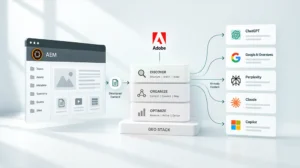
Key Takeaways
- Model Context Protocol (MCP) is the layer that enables AI tools to take real actions within Adobe Experience Cloud, not just generate text alongside it.
- Adobe has been building MCP support directly into AEM, Adobe Target, Adobe Journey Optimizer and other Experience Cloud products throughout 2025 and 2026. This is available now, not on a future roadmap.
- For marketing ops and content teams, MCP means AI can draft, update, tag and publish content inside your live Adobe environment using plain-language instructions.
- 2026 is the window because Adobe’s MCP rollout is still early. Teams that configure it now build a real operational advantage. Teams that wait will spend the next two years catching up.
What MCP Actually Is
You’ve probably heard the term MCP come up more in the past few months. Most explanations go straight into technical language and lose the room quickly.
Here’s the version that matters for marketing and content ops leaders.
AI tools like ChatGPT or Claude are good at generating content. What they’ve historically been bad at is doing anything with that content inside the systems your team actually uses. They produce a draft and then a human copies it, logs into Adobe, finds the right page, pastes it in and tags it manually. The AI was a writing tool. The actual work of running your content environment stayed manual. Sound like your team’s setup?
MCP changes that. It’s an open standard that lets AI tools connect directly to platforms like Adobe Experience Cloud and take real action inside them. Not just write. Actually do things: create pages, update content, tag assets, trigger workflows, check content against brand guidelines and push changes through for review.
A simple way to think about it: before MCP, AI was a capable assistant sitting outside your office, passing notes through the door. With MCP, that assistant has a key, knows where everything is and can walk in and do the work.
Adobe has now built MCP support into its core products. That’s what makes this relevant to content ops and marketing leaders today, not just developers.
What Adobe Has Actually Built
This isn’t a pilot program. Adobe has been shipping MCP integration across several Experience Cloud products throughout 2025 and 2026. Here’s what’s live:
Adobe Product | What Your Team Can Now Do With AI |
Adobe Experience Manager (AEM) | Create, edit and publish pages and content fragments. Search and import assets. Manage content across multiple sites and regions. |
Adobe Target | Inspect A/B tests, analyze performance reports and explore audiences and offers using natural-language prompts, without navigating multiple UI screens. |
Adobe Journey Optimizer | Access and collaborate on campaign and channel configuration data directly from Claude, without switching platforms or writing API queries. |
The AEM integration is the most relevant for content operations teams day to day. When a content manager types something like “update the hero banner for the spring campaign across all regional pages,” the AI identifies what needs to change, makes the updates inside AEM and routes for review. The same access rules your team has manually still apply. The AI can’t touch anything the logged-in user doesn’t already have permission to edit.
For marketing ops leaders, the Target and Journey Optimizer integrations matter just as much. MCP is what connects audience data, personalization and campaign management without your team having to manually bridge each system.
What This Looks Like for a Content Team Day to Day
The difference between “AI integration” and something a content ops leader actually cares about usually comes down to specifics. Here’s what MCP-enabled workflows look like in practice.
Without MCP:
- Writer drafts content in a separate AI tool
- Copies and pastes output into AEM manually
- Finds the correct page or template
- Formats and places content
- Tags assets one by one
- Submits for review through a separate system
- Publishes after approval
With MCP (AI connected directly to Adobe):
- Writer describes the task in plain language
- AI drafts content, places it in the right template, applies tags and routes for review
- Approval and publish happen inside the same flow
The practical result is fewer manual steps between content being created and content going live. For teams managing high volumes across multiple sites or markets, that reduction changes what’s achievable with the headcount you already have.
Here are some specific things teams are doing right now with MCP inside AEM:
- Updating content across multiple regional pages in one instruction instead of going page by page
- Searching the DAM using plain-language descriptions instead of navigating folder structures
- Checking content against brand guidelines automatically before it goes to review
- Coordinating localization across different regional versions without manual back-and-forth between teams
Three Things Worth Understanding Before You Activate
You don’t need to understand how MCP works at the code level to make good decisions about it. But these three points are worth knowing because they affect whether your implementation holds up as your team grows.
1. Your existing access rules still apply. When AI is given access to a live content environment, the first question is always: what can it change and who controls that? With Adobe’s MCP setup, the AI operates under the same access rules as the person using it. If a content author can’t publish directly to your main website, the AI acting on their behalf can’t either. This isn’t a separate safeguard bolted on. It’s built into how the system works.
2. MCP is an open standard, not an Adobe-only format. This matters for teams thinking about long-term flexibility. Because MCP is an open protocol, the same connection that works with Claude or ChatGPT today will work with other AI tools as the ecosystem develops. You’re not tied to one AI vendor by choosing to activate MCP inside Adobe.
3. Your content doesn’t feed into AI training. A common concern with AI in enterprise environments is whether your proprietary content ends up being used to train the AI model. With Adobe’s MCP setup, the AI accesses and acts on your content in real time and that content isn’t used for training. It stays in your environment.
If you’re thinking about how MCP fits into a broader Adobe buildout, or want to understand where it sits in the implementation sequence, this phase-based implementation roadmap is a useful reference before you start configuration work.
Why 2026 Is the Window
Adobe’s MCP rollout is recent and moving fast. AEM’s Content MCP Server has been shipping since early 2026. Adobe Target’s MCP server launched in public beta, with active documentation updates through mid-2026. The standard is being adopted widely.
That timing creates two practical advantages for teams that move now.
Early activation builds compounding returns. Teams that get MCP working in 2026 will have a year or more of AI-assisted content operations experience before competitors who wait. Content velocity, asset organization, personalization capability and governance practices all improve through use. The gap between early and late movers tends to widen, not close.
The configuration window is open. Right now, organizations activating MCP well inside their Adobe environment are defining what good looks like for their industry. That’s a very different position from implementing a mature, widely adopted tool two or three years from now when everyone has it.
This isn’t an argument for rushing into a poorly planned setup. It’s a reason to treat MCP activation as a strategic priority this year rather than a project to schedule later.
What Activation Actually Takes
Here’s an honest picture of what getting started involves, written for leaders rather than developers.
What you need to have in place first:
- AEM as a Cloud Service (MCP is a Cloud Service feature and isn’t available on older on-premise installations)
- The right Adobe license tier for the MCP products you want to activate
- A clear picture of who has access to what in your content environment before you connect AI to it
What the setup involves:
- Connecting your preferred AI tool (Claude, ChatGPT, Cursor and Microsoft Copilot Studio are all currently supported for AEM) to Adobe’s MCP servers
- Signing in through Adobe’s identity system
- Deciding which workflows you want to automate first and what guardrails you want in place
Where most of the time goes: Getting the foundation right before activation. If your DAM has inconsistent tagging, AI-assisted tagging will replicate that inconsistency at scale and faster. If your content access structure is unclear, you’ll spend time fixing permission issues mid-setup rather than after. The teams that move through MCP activation fastest are the ones that sorted governance and taxonomy first. Not a tall order, but it does require honest prep work before you flip the switch.
This is why IT and marketing need to be aligned before activation begins, not after. If that conversation hasn’t happened yet in your organization, this post on why IT and marketing misalignment is the most common risk in Adobe implementations is worth reading before you start.
The Practical Summary
MCP isn’t a future capability. It’s running in production inside Adobe Experience Cloud right now and enterprise teams are using it to cut the manual work between content creation and content going live.
For executive buyers, the case is simple: the platform you’re already paying for can now do significantly more with the team you already have. Activation is a configuration and workflow decision, not a new purchase.
For marketing ops leaders, it’s equally direct: MCP is what makes AI a real part of your content operations, rather than a drafting tool your team uses on the side and then pastes from.
The white paper goes deeper on each of the five focus areas where MCP and Adobe’s AI layer produce the clearest returns, including what the activation path looks like for each and what teams have found after running it in a live environment.
Frequently Asked Questions
MCP stands for Model Context Protocol. It’s an open standard that lets AI tools connect to real software systems and take action inside them, rather than just producing text. The reason it’s getting attention now is that Adobe and other major platforms have built MCP support directly into their products in 2025 and 2026, making AI integration a practical option for content and marketing teams, not just a developer experiment.
Some technical involvement is needed for the initial setup. Once the connection is established, content authors and marketing ops teams can give instructions in plain language without needing to understand the underlying configuration. The technical work is a one-time setup, not an ongoing requirement.
MCP support is currently available for AEM as a Cloud Service, Adobe Target and Adobe Journey Optimizer. It isn’t available for older on-premise AEM installations. License requirements vary by product, so a Focus Area Audit is the fastest way to confirm what your current setup already supports.
Adobe’s built-in AI Assistant is a guided interface for specific tasks like content generation and asset search. MCP is the underlying connection that lets external AI tools (Claude, ChatGPT and others) work inside AEM directly. The two work alongside each other. Adobe recommends using the built-in AI Assistant for content edits and deletions, since it includes additional review steps before changes go through.
The AI can only access and change what the logged-in user is already permitted to touch. Content is accessed in real time and isn’t used to train the underlying AI model. Adobe’s identity system controls authentication, so access is scoped and auditable in the same way manual work is.
Ready to see which focus areas are most relevant for your Adobe environment? Download the white paper for the full picture.