Key Takeaways
- AEM Guides is a cloud-native Component Content Management System (CCMS) designed to manage technical documentation at scale.
- It utilizes DITA to allow teams to create, manage and publish content as reusable components.
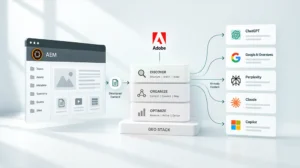
- Multi-channel publishing enables a single source of truth to power web, PDF, mobile apps and headless applications simultaneously.
- Native integration with Adobe Experience Cloud ensures that technical documentation isn’t siloed away from marketing and analytics.
- It significantly reduces “Time-to-Market” by allowing global updates from a single source component to propagate across thousands of pages without manual editing.
For an organization managing thousands of pages of technical documentation, the traditional Content Management System (CMS) often becomes a bottleneck. Most platforms are designed for marketing copy, not the complex, structured data required for manuals, help guides and compliance papers.
Adobe Experience Manager (AEM) Guides solves this by bringing component-based authoring into the enterprise ecosystem. It’s a specialized solution for those who need to manage high-velocity technical content without losing the brand consistency of their main site.
What is Adobe Experience Manager Guides?
AEM Guides (formerly known as XML Documentation for AEM) is a powerful, enterprise-grade Component Content Management System (CCMS). While a standard CMS manages pages, a CCMS like AEM Guides manages “components” or small blocks of information.
Think of it this way: instead of writing a 50-page manual as one document, you write 50 individual “topics.” If a safety warning or a product spec change, you edit it once and it automatically updates everywhere that topic is used. Every manual. Every website. Every app.
It’s built directly on top of AEM, which means you don’t have to jump between different platforms to manage your marketing site and your technical help center. They live in the same environment, sharing the same assets and governance.
The Role of DITA in Structured Content
At the heart of AEM Guides is Darwin Information Typing Architecture (DITA). It’s an XML-based standard for authoring and delivering information. It’s the “secret sauce” that makes content reusable and searchable.
Most beginners find DITA intimidating because it requires a shift in mindset. You aren’t “formatting” a document; you’re “structuring” information. Because the content is structured, AEM Guides can handle the formatting for you. You write the text once and the system applies the correct CSS for the web or the right layout for a PDF.
If you’re new to this concept, our guide, DITA 101: Structured Content for Reuse and Compliance, breaks down exactly how this structure saves hundreds of hours in manual editing.
Core Features of AEM Guides
AEM Guides isn’t just a text editor; it’s a full lifecycle management tool for technical communication. Here are the features that define the platform:
1. A Powerful Web-Based Editor
You don’t need to be an XML expert to use AEM Guides. It provides a user-friendly, browser-based editor that feels familiar to anyone who’s used a modern CMS. It supports “What You See Is What You Get” (WYSIWYG) editing, but allows power users to dive into the XML code when necessary.
2. Advanced Content Reuse
This is where the ROI truly lives. You can reuse a single paragraph, a table, or an entire chapter across multiple “Maps” (the DITA term for a document’s structure). This eliminates the “copy-paste” errors that plague large organizations.
3. Automated Publishing Workflows
In the old days, generating a PDF from a website took a designer. With AEM Guides, it’s a one-click process. You can publish to AEM Sites, PDF, HTML5, EPUB, JSON for headless applications, Knowledge Base platforms and custom output via DITA-OT. This ensures your customers always see the latest version, regardless of how they access it.
4. Version Control and History
Because technical content is often tied to legal compliance, knowing “who changed what and when” is critical. AEM Guides provides deep versioning, allowing you to revert to previous states or compare two versions of a document side-by-side.
Why Do Enterprises Need AEM Guides?
If you’re only managing a 10-page website, AEM Guides is overkill. But for enterprises, especially in healthcare, manufacturing or software, the complexity of content can quickly become unmanageable.
Eliminate Content Silos
Often, the marketing team uses one CMS while the technical writers use a different, legacy tool. This creates a “disconnect” where the technical documentation looks and feels different from the rest of the brand. AEM Guides brings everyone into the same ecosystem. This is a critical part of AEM Cloud Service success, as it consolidates your technical stack.
Global Consistency at Scale
Imagine having to update a “Terms and Conditions” block across 180 regional sites. Doing this manually is a recipe for disaster. By using AEM Guides, you update the master component once. This level of control enabled us to unify one company’s AEM migration across nearly 200 sites, ensuring governance was baked into the architecture from day one.
Translation and Localization Efficiency
AEM Guides integrates with translation memory tools. Since you’re only translating “topics” rather than whole documents, you don’t waste money re-translating content that hasn’t changed. This can significantly reduce translation costs, as organizations pay only to translate new or changed topics rather than retranslate entire documents.
How AEM Guides Works with the Rest of Adobe Experience Cloud
One of the biggest mistakes companies make is treating technical documentation as a “passive” resource. In reality, your help guides are a goldmine of customer data.
When technical content from AEM Guides is published to AEM Sites, you can leverage Adobe Target to personalize the experience based on who’s looking at it. For example, a “Pro” user might see advanced troubleshooting steps, while a “Beginner” sees a simplified version. If you’re looking to bridge that gap, you can learn more about how to integrate AEM and Adobe Target to start personalizing the entire customer journey.
Getting Started: A Step-by-Step Approach
If your organization is considering a move to AEM Guides, don’t try to boil the ocean on day one. Here’s a typical roadmap for success:
- Audit Your Content: Identify which pieces of content are repeated most often. These are your first candidates for DITA topics.
- Define Your Taxonomy: How will you tag your content? Good metadata is what makes AEM Guides searchable for both your team and AI search engines.
- Train Your Authors: Shift the focus from “document writing” to “topic authoring.”
- Establish Governance: Set up your workflows. Who approves a technical change? How is it pushed live?
The Future of Technical Content
In the era of AI and Answer Engine Optimization (AEO), structured content is no longer optional. AI agents can’t read a 200-page “flat” PDF effectively. They need the structured, tagged and modular data that AEM Guides provides.
By moving to AEM Guides, you aren’t just cleaning up your documentation; you’re future-proofing your information architecture. You’re making it possible for AI to find and deliver the exact answer your customer needs in seconds.
A Better Way Forward
AEM Guides is the bridge between complex technical information and a seamless customer experience. It removes the friction of “copy-paste” workflows and replaces them with a scalable, governed system. For the modern enterprise, it’s the difference between a documentation “graveyard” and a vibrant, helpful content ecosystem.
If your technical content is currently a “visibility gap” in your organization, let’s talk about how to unify it. Contact NetEffect Today to see how we can help you architect a content strategy that scales.
Frequently Asked Questions
It’s used to create, manage and publish large volumes of technical and help content. It uses a structured format (DITA) to allow for massive content reuse across multiple channels.
No. AEM Sites is a standard CMS for web pages. AEM Guides is a CCMS (Component CMS) specifically for structured technical documentation. However, they are built on the same platform and work together natively.
While the system is based on XML (DITA), you don’t need to be a coder. The built-in web editor allows writers to create content in a visual environment similar to Microsoft Word or Google Docs.
Because the content is structured and metadata-rich, it’s easier for search engines (and AI engines) to crawl and index. This can improve your content’s visibility and increase the likelihood of appearing in “featured snippets,” though rankings depend on many factors beyond content structure alone.
Yes. It has built-in translation workflows that allow you to manage multi-language content efficiently by only translating updated components rather than the entire document.