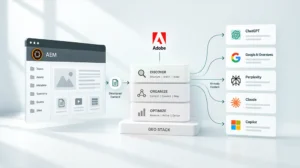
Key Takeaways
- MadCap Flare serves desktop-focused technical writing, while AEM Guides enables enterprise-wide cloud collaboration.
- AEM Guides merges technical documentation with marketing assets to ensure a consistent customer journey.
- Global organizations leverage AEM’s cloud-native and headless capabilities to manage complex content supply chains.
- Moving from Flare to AEM Guides shifts operations from document-based silos to a modular DITA ecosystem.
- AEM Guides provides advanced versioning and workflow automation missing in localized authoring environments.
Technical documentation stopped being an afterthought years ago. It’s now central to how customers experience your product. Enterprise leaders face a choice: adopt a powerful tool for your technical team, or build a unified supply chain for the whole organization?
MadCap Flare is a workhorse for technical writers. It gives you deep control over CSS and print outputs. But as companies shift to digital-first delivery, localized authoring hits a ceiling.
AEM Guides represents the next step. It embeds structured content management directly into the Adobe Experience Cloud. Pick the wrong tool and you create technical debt. Fragmented voices. Manual workflows that eat up hours. To find the right fit, we need to look past the interface and examine the underlying architecture.
Flare: Precision for Technical Teams
MadCap Flare is built on a desktop-first philosophy. It excels when a dedicated group of technical writers manages complex manuals with a high degree of stylistic control.
Strengths in Authoring
Flare uses XHTML-based authoring with MadCap-specific features that are flexible for print and web layouts. It provides excellent out-of-the-box templates for PDF generation. For teams that don’t need real-time collaboration with marketing or sales, Flare’s localized project management often does the job.
The Localized Bottleneck
The trouble starts when you scale.
Because Flare is a standalone desktop application, collaboration usually means checking out files or using secondary tools for reviews. This creates a silo. Technical documentation lives in one world. Marketing assets live in another. That separation often breaks the customer journey when a user moves from a marketing landing page to a technical help portal.
AEM Guides: Enterprise Ecosystem
AEM Guides is a cloud-native CCMS built on top of Adobe Experience Manager. It’s designed to treat technical documentation as a strategic asset. By using the Darwin Information Typing Architecture (DITA) standard, it breaks content into reusable, modular components.
Unified Content Supply Chain
AEM Guides lets technical writers, marketing teams and subject matter experts work within the same environment. No need to export files for review. Comments and approvals happen in real time within the browser. This keeps your tech docs aligned with the same sophisticated brand voice as your marketing site.
Native Adobe Integration
The real power of AEM Guides lies in its ecosystem. It integrates natively with AEM Assets, allowing writers to pull the same approved images and videos used by marketing. This is essential for building a composable tech stack with AEM.
Direct Comparison: AEM Guides vs MadCap Flare
When evaluating these platforms, it helps to see how they handle specific enterprise requirements.
| Feature | MadCap Flare | AEM Guides |
| Architecture | Desktop-based with optional cloud collaboration | Cloud-native (Browser-based) |
| Content Standard | XHTML | DITA (XML) Standard |
| Collaboration | External review tools needed | Native real-time web reviews |
| Omnichannel | Good for Web/PDF | Headless, Web, Mobile, IoT, Chatbots |
| Localization | Requires MadCap Lingo | Integrated Translation Workflows |
| Scalability | Limited by project size/local sync | Enterprise-scale (billions of assets) |
Content Governance and Workflows
Governance often decides the winner for regulated industries like semiconductors, medical devices or financial services. In these sectors, a documentation error is a compliance risk.
MadCap Flare relies on manual checks or basic source control (like Git or SVN) to manage versions. AEM Guides, however, uses the power of AEM workflows. You can automate the entire lifecycle of a document, from initial draft to legal review and final publication.
These workflows ensure that no content goes live without meeting quality standards. They also manage the “where used” logic. If a safety warning changes, AEM Guides identifies every single manual, web page and app screen where that warning appears. Universal update in one click.
Omnichannel Delivery and Headless Capabilities
The way users consume documentation has changed. They rarely download a 500-page PDF. Instead, they ask a chatbot a specific question or look for a how-to video on their mobile device.
Flare’s Delivery: Flare produces excellent tripane or side navigation HTML5 outputs. However, these are often static sites that are difficult to integrate into a modern web application without significant custom coding.
AEM’s Delivery: AEM Guides is headless-ready. It can deliver content as structured JSON data to any device. This flexibility lets organizations build a scalable AEM component library for enterprise delivery, ensuring that documentation is as interactive and responsive as the rest of the digital experience.
Flare to AEM Migration
Many organizations reach a tipping point where Flare projects become too large to manage. Migrating to AEM Guides is a significant undertaking, but it’s a one-time investment in future-proofing your content.
The Technical Transition
The process involves converting Flare’s XHTML into DITA XML. Adobe provides native ingestion tools that map Flare’s styles to DITA elements. The goal is to identify content debt, duplicate information that can be consolidated into a single reusable component.
Implementation Costs
Let’s be clear about AEM implementation costs; AEM Guides is a premium enterprise solution.
The initial setup requires architectural planning and data cleanup. However, the ROI is realized through reduced localization costs and the elimination of the manual coordination tax that plagues desktop-based workflows.
Strategic Business Case
Why do global enterprises make the switch? It usually comes down to three pillars of efficiency:
- Reduced Localization Spend: By reusing content at the component level, you only translate a sentence once, regardless of how many manuals it appears in.
- Faster Time-to-Market: Product updates can be reflected in documentation simultaneously with the release, rather than waiting weeks for manual formatting.
- Search Engine Optimization: AEM Guides produces search-friendly, metadata-rich content that helps customers find answers faster, reducing the load on support desks.
Choose the Right Path
The choice between AEM Guides and MadCap Flare isn’t about which tool has better features. It’s about which tool fits your operational model.
MadCap Flare is a high-performance choice for specialized technical writing teams who need a standalone solution for manuals and help files.
AEM Guides is the strategic choice for enterprises that view documentation as a critical part of the customer journey. It breaks down the silos between technical and marketing content, providing a unified, cloud-native platform that scales with the business.
Ready to architect your content supply chain?
NetEffect specializes in enterprise AEM implementations. We help you move beyond fragmented tools and into a unified, high-performance ecosystem. Whether you’re migrating from Flare or starting a new DITA journey, our team ensures your documentation delivers measurable value.
Contact NetEffect to Evaluate Your CCMS Strategy
Frequently Asked Questions
AEM Guides is an enterprise-grade platform. The total cost of ownership is higher than Flare due to infrastructure and implementation. However, for large organizations, the savings in localization and manual labor often offset the initial implementation costs.
Yes. AEM Guides uses a powerful PDF publishing engine (based on DITA-OT) that allows for the same level of branding and layout control as MadCap Flare.
No. AEM Guides features a WYSIWYG web editor. While the underlying data is XML, the interface is as intuitive as a standard word processor.
Depending on the volume of content, a typical migration can take between three to six months. This includes data cleanup, mapping XHTML to DITA and setting up automated workflows.
Absolutely. Many organizations use AEM Guides for HR policies, legal disclosures and training materials because of its superior governance and reuse capabilities.